Tutorial 6: 3D Mouse Brain
Load the Mouse Brain
[11]:
import scanpy as sc
import pandas as pd
import numpy as np
import matplotlib.pyplot as plt
import sys
import os
import gc
import warnings
warnings.filterwarnings("ignore")
sys.path.append('/mnt/mydisk/home/chenxd/FlatST')
import FlatST
import STAGATE_pyG
[12]:
adata = sc.read_h5ad('/mnt/mydisk/home/chenxd/FlatST/Reply/9/counts_mouse4_sagittal.h5ad')
Processing three-dimensional data
[13]:
z_coords = {'sa2_slice1': 0, 'sa2_slice2': 20, 'sa2_slice3': 40}
adata.obs['Z'] = adata.obs['slice_id'].map(z_coords).astype(float)
adata.obs['X'] = adata.obs['center_x']
adata.obs['Y'] = adata.obs['center_y']
adata.obs['Section_id'] = adata.obs['slice_id']
[14]:
# Important: Add spatial coordinates to obsm
adata.obsm['spatial'] = adata.obs[['center_x', 'center_y']].values
[15]:
# Normalization
sc.pp.highly_variable_genes(adata, flavor="seurat_v3", n_top_genes=3000)
sc.pp.normalize_total(adata, target_sum=1e4)
sc.pp.log1p(adata)
Training
[16]:
# FlatST 3D Spatial Network
section_order = ['sa2_slice1', 'sa2_slice2', 'sa2_slice3']
keep_cells = adata.obs.notna().all(axis=1)
adata = adata[keep_cells].copy()
FlatST.Cal_Spatial_Net_3D(adata, rad_cutoff_2D=10, rad_cutoff_Zaxis=1,
                           key_section='Section_id', section_order=section_order, verbose=True)
Radius used for 2D SNN: 10
Radius used for SNN between sections: 1
------Calculating 2D SNN of section  sa2_slice1
This graph contains 12254 edges, 43835 cells.
0.2795 neighbors per cell on average.
------Calculating 2D SNN of section  sa2_slice2
This graph contains 18284 edges, 52298 cells.
0.3496 neighbors per cell on average.
------Calculating 2D SNN of section  sa2_slice3
This graph contains 30808 edges, 77716 cells.
0.3964 neighbors per cell on average.
------Calculating SNN between adjacent section sa2_slice1 and sa2_slice2.
This graph contains 358 edges, 96133 cells.
0.0037 neighbors per cell on average.
------Calculating SNN between adjacent section sa2_slice2 and sa2_slice3.
This graph contains 342 edges, 130014 cells.
0.0026 neighbors per cell on average.
3D SNN contains 62046 edges, 173849 cells.
0.3569 neighbors per cell on average.
[17]:
# Train FlatST - reducing epochs for verification
adata = FlatST.train_FlatST(adata, n_epochs=1000, is_distribution=0.0, num_smooth_iterations=[4,0], cuda_device=4)

# mclust
os.environ['R_HOME'] = '/mnt/mydisk/home/chenxd/.conda/envs/r_env/lib/R'
num_cluster = 15
adata = FlatST.mclust_R(adata, num_cluster, used_obsm='FlatST')
Size of Input: (173849, 1135)
100%|██████████| 1000/1000 [02:04<00:00, 8.03it/s]
fitting ...
  |======================================================================| 100%
Draw
[ ]:
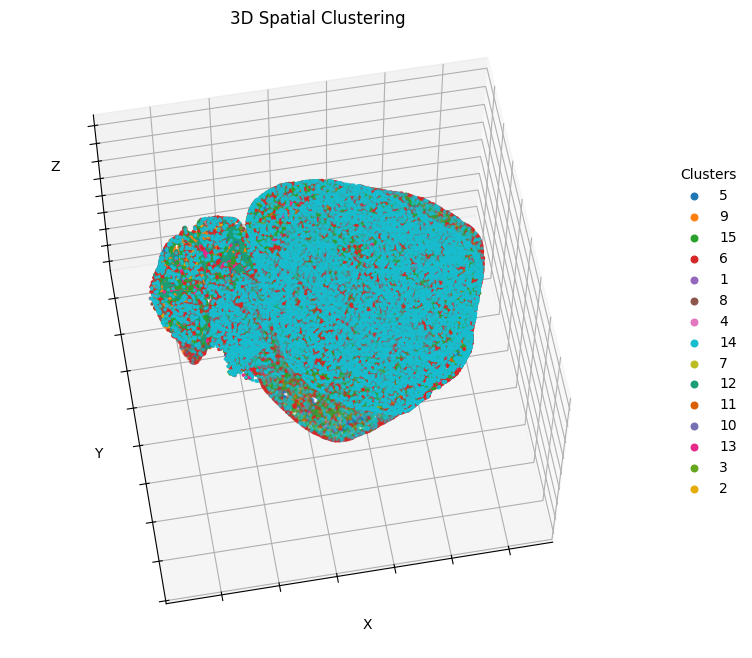
# Plot 3D clusters
import matplotlib.pyplot as plt
import pandas as pd
import numpy as np

fig = plt.figure(figsize=(8, 8))
ax1 = plt.axes(projection='3d')

# Define a color list containing sufficient colors to match your num_cluster.
adata.uns['mclust_colors'] = ['#1f77b4', '#ff7f0e', '#2ca02c', '#d62728', '#9467bd',
                              '#8c564b', '#e377c2', '#17becf', '#bcbd22', '#1b9e77',
                              '#d95f02', '#7570b3', '#e7298a', '#66a61e', '#e6ab02']

# Get all cluster labels
region_labels = pd.Series(adata.obs['mclust']).dropna().unique().tolist()

for it, label in enumerate(region_labels):
    # Filter out the cells belonging to the current cluster
    temp_Coor = adata.obs.loc[adata.obs['mclust'] == label, :]
    temp_xd = temp_Coor['X']
    temp_yd = temp_Coor['Y']
    temp_zd = temp_Coor['Z']

    # Cycle through the colors in the list to assign colors to the clusters
    color = adata.uns['mclust_colors'][it % len(adata.uns['mclust_colors'])]

    # Plot 3D scatter plot for the current cluster
    ax1.scatter3D(temp_xd, temp_yd, temp_zd, c=color, s=10, marker=".", label=label)

# Hide axis labels to keep the plot clean
ax1.set_xlabel('X')
ax1.set_ylabel('Y')
ax1.set_zlabel('Z')
ax1.set_xticklabels([])
ax1.set_yticklabels([])
ax1.set_zticklabels([])

# Set legend legend and view angle
plt.legend(bbox_to_anchor=(1.2, 0.8), markerscale=3, frameon=False, title="Clusters")
plt.title('3D Spatial Clustering')
ax1.elev = 60  # elevation
ax1.azim = 80 # azimuth

# Show the plot
plt.show()
[ ]:
import scanpy as sc
import matplotlib.pyplot as plt

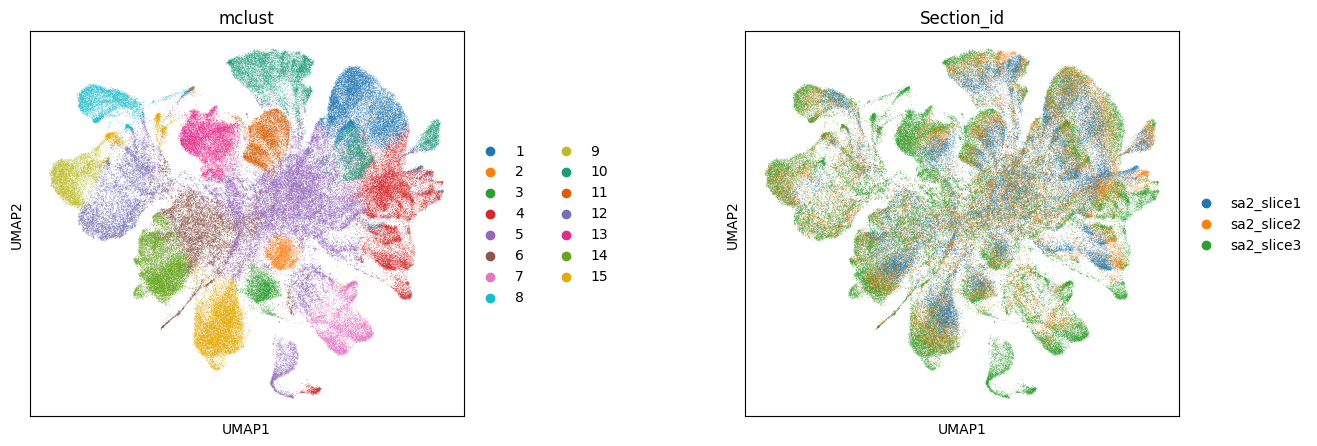
# Calculate FlatST features and run UMAP embedding based on the FlatST features extracted
sc.pp.neighbors(adata, use_rep='FlatST')
sc.tl.umap(adata)

# Set figure size
plt.rcParams["figure.figsize"] = (5, 5)

# Plot UMAP embedding with color by mclust and Section_id
sc.pl.umap(adata, color=['mclust', 'Section_id'], wspace=0.5)
[ ]:
# Store spatial coordinates in obsm for scanpy plotting
adata.obsm['spatial_2d'] = adata.obs[['X', 'Y']].values

# Get all slice IDs
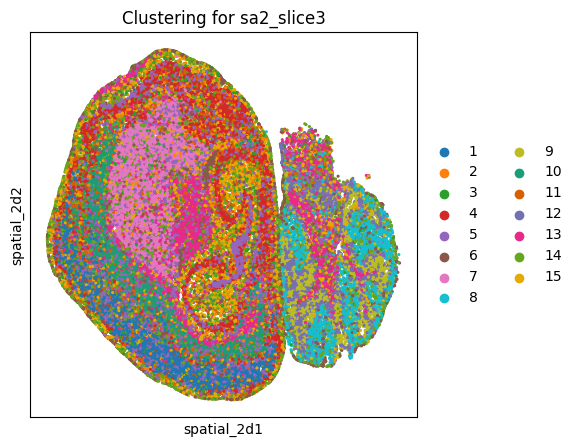
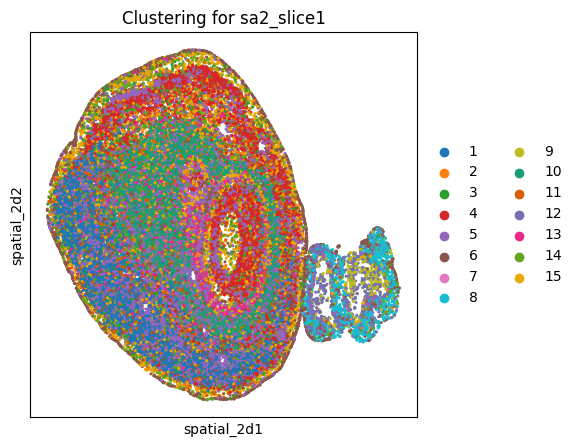
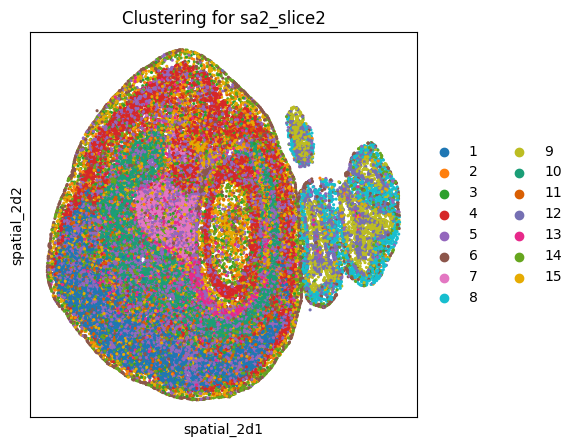
slices = adata.obs['Section_id'].unique()

for slice_id in slices:
    # Extract data for each slice
    adata_sub = adata[adata.obs['Section_id'] == slice_id].copy()

    # Plot clustering results for each slice
    sc.pl.embedding(adata_sub, basis='spatial_2d', color='mclust',
                    title=f'Clustering for {slice_id}',
                    size=20, show=True)